Best PoE Security Cameras UK 2025
Last updated: April 2025 | All cameras tested or researched for UK home use
If you're comparing cameras as part of a wider smart home or CCTV setup, start with our Home Assistant audit intake before you buy. PoE security cameras are the gold standard for home CCTV. Power and data over a single Ethernet cable means no battery faffing, no WiFi dropouts, and rock-solid reliability. I've been running PoE cameras at home for two years, integrated with Home Assistant, and I've tested and researched the top picks available to UK buyers in 2025. If your real goal is pet monitoring, start with the Home Assistant pet monitoring guide before choosing camera hardware. If you want a more specific path, the pet monitoring setup finder and dog monitoring guide will route you faster; if you want the whole-room camera that fits that use case best, read the Reolink fisheye review next. But with dozens of options available in the UK, picking the right one is harder than it looks.
Need the right PoE switch for these cameras?
If you already know the camera shortlist, use the PoE power budget calculator to sanity-check wattage, or start with the best PoE switches guide if you want a ready-made shortlist.
Check your PoE budgetOwn a subscription product?
PoE buyers are actively choosing local recording and fewer recurring fees; if your product has a plan, trial, or cancellation flow, the subscription retention audit can spot friction before it cuts renewals.
Book the auditSelling camera plans or app access?
If your camera business has storage, monitoring, or app subscriptions, the subscription retention audit can show where renewals leak away.
Book the auditQuick Comparison Table
| Camera | Resolution | Field of View | Night Vision | PoE Standard | Home Assistant | Price (approx) |
|---|---|---|---|---|---|---|
| Real goal: pet monitoring | — | — | — | — | Start with our Home Assistant pet monitoring guide | Free |
| Reolink Fisheye PoE | 6MP | 180° fisheye | IR + colour | 802.3af | ✅ Native RTSP | ~£150 |
| Reolink RLC-810A | 4K 8MP | 105° | IR + colour | 802.3af | ✅ Native RTSP | ~£80 |
| Hikvision DS-2CD2143G2-I | 4MP | 100° | IR only | 802.3af | ✅ ONVIF | ~£70 |
| Annke C800 | 4K 8MP | 98° | IR only | 802.3af | ✅ ONVIF | ~£65 |
| Amcrest IP8M-2493EW | 4K 8MP | 105° | IR + colour | 802.3af | ✅ ONVIF | ~£90 |
Why PoE Instead of WiFi?
Before we get into the picks: if you're serious about home security, PoE is the right call.
WiFi cameras are convenient for renters or low-stakes use, but they have real weaknesses: they depend on your router's WiFi coverage, they're susceptible to interference, and most cheap models have questionable cloud security. They also stop recording if your broadband goes down.
PoE cameras fix all of this. A single Cat5e or Cat6 cable carries both power and data. You can run them from a PoE NVR or a PoE switch connected to your home server. They work even if your internet is down, record locally to an NVR or NAS, and the image quality is consistently better because you're not compressing over WiFi.
If you're running Home Assistant, PoE cameras integrate via RTSP or ONVIF — no cloud dependency, no subscription required.
The Best PoE Security Cameras UK 2025
1. Reolink Fisheye PoE — Best for Whole-Room Coverage
Best for: Large open-plan rooms, pet monitoring, full-room coverage without blind spots
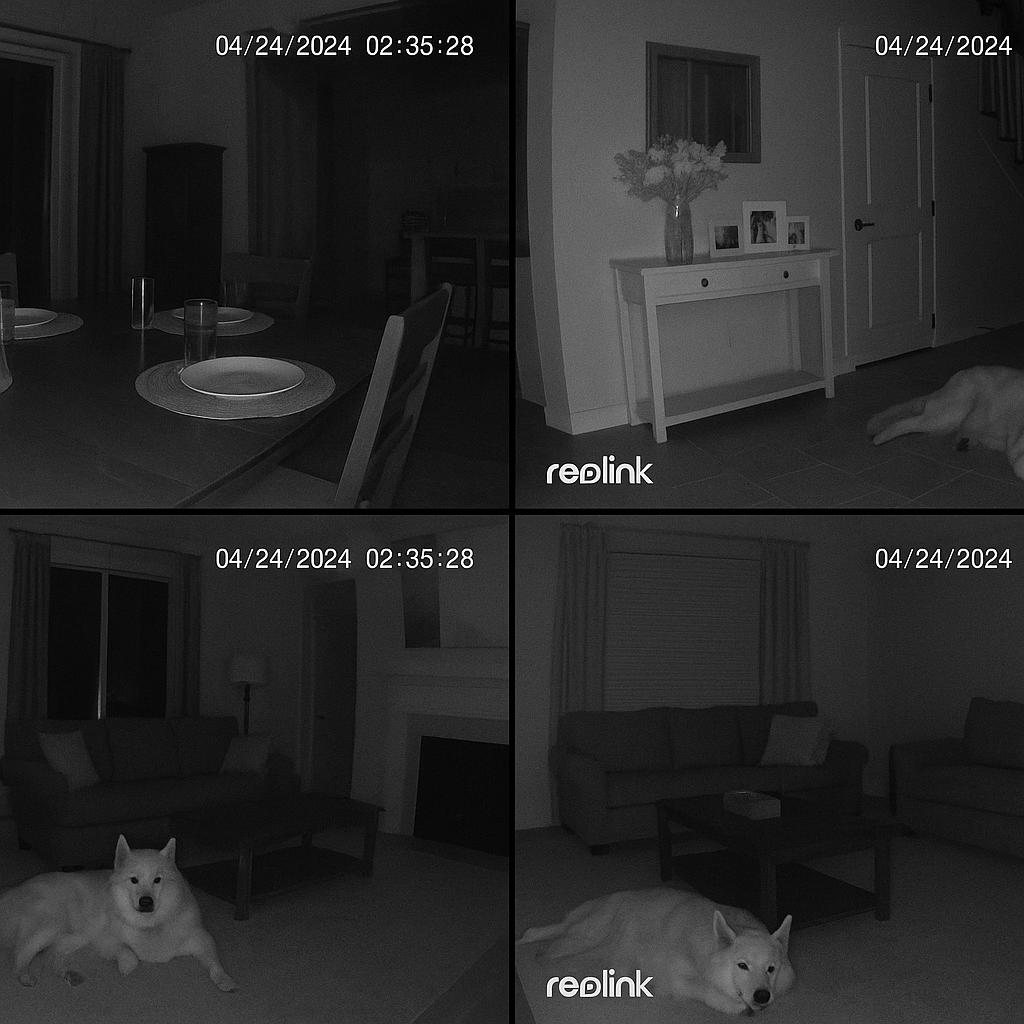
The Reolink Fisheye is unlike most security cameras. Instead of a standard lens with a 90–105° field of view, it uses a 180° fisheye lens that captures an entire room in a single shot. No pan-tilt required. No blind spots in corners.
I bought this specifically to monitor our Alaskan Malamute (Ice) when we're out, and it's the most useful camera I've installed. One camera covers our entire open-plan lounge and dining area — something that would require two or three standard cameras to replicate.
What makes it stand out:
- 6MP resolution across 180° — still plenty of detail
- Night vision is genuinely good: IR mode kicks in automatically, but it also supports colour night vision in low light
- Two-way audio is clear — you can talk to your pet (or family member) without the usual garbled mess
- Home Assistant integration via RTSP is seamless — no cloud required
- PoE powered — position it exactly where you need it with a single cable
The trade-off: The fisheye distortion takes some getting used to. Reolink's app includes dewarping so you can get a more natural view, but the raw feed is curved. For detail on specific spots (a door, a driveway), a standard lens camera is more appropriate. For room-wide monitoring, nothing beats it.
Verdict: If you need to monitor a large room — especially with pets — this is the one to buy. Read our full Reolink Fisheye PoE review for more.
2. Reolink RLC-810A — Best All-Rounder
Best for: Driveways, gardens, entry points — anywhere you want 4K detail
The RLC-810A is Reolink's best standard PoE camera and a genuine all-rounder. 4K (8MP) resolution means you can read number plates and identify faces at a reasonable distance. Smart detection (person, vehicle, pet) means fewer false alerts from leaves blowing past.
Highlights:
- 4K 8MP with excellent detail in daylight
- Smart detection reduces false motion alerts significantly
- Colour night vision — actually useful, not just a marketing feature
- Active deterrent version available with spotlight + siren
- Home Assistant via RTSP — works flawlessly
This is the camera I'd recommend for front doors, driveways, and garden coverage. It's priced sensibly for what you get.
3. Hikvision DS-2CD2143G2-I — Best Build Quality
Best for: Set-and-forget reliability, professional installations
Hikvision is the brand professional CCTV installers use. The DS-2CD2143G2-I is their workhorse dome camera — 4MP, deep learning motion detection, and build quality that will outlast most smart home kit. If you want something you'll install once and forget about for a decade, this is it.
Highlights:
- Hikvision's AcuSense technology — almost no false alerts
- IP67 weatherproof and IK10 vandal-resistant
- ONVIF compliant — works with any NVR and with Home Assistant
- The 4MP resolution is lower than the Reolink, but the image processing is better
Trade-off: The app and setup interface are functional but not user-friendly. This is a camera for people comfortable with ONVIF settings and NVR configuration. Home Assistant users will be fine — just use ONVIF integration.
4. Annke C800 — Best Value 4K
Best for: Budget 4K coverage without compromising on resolution**
The Annke C800 delivers 4K resolution at a price that undercuts most of the competition. Image quality is solid, it supports H.265+ compression (saves storage), and it's fully ONVIF compatible.
It's not packed with smart features — the motion detection is basic compared to Hikvision or Reolink — but if you're running everything through Home Assistant with Frigate for AI detection, that's not a problem. Frigate handles the intelligence; the camera just needs to deliver a clean stream.
If you're building a multi-camera setup and need to keep costs down, the Annke C800 is the pick.
5. Amcrest IP8M-2493EW — Best with Colour Night Vision
Best for: Areas where you need colour identification at night (car colours, clothing)**
Amcrest's 4K turret camera is one of the few in this price range that does colour night vision well. In areas with any ambient light (street lights, garden lights), you get a full-colour image at night rather than black and white IR footage. For identifying a car colour on a driveway or what someone was wearing, this is genuinely useful.
ONVIF compatible, works well with Home Assistant, and the image quality is competitive with the Reolink RLC-810A.
What PoE Equipment Do You Need?
A PoE camera needs two things: a network connection and power. You have two ways to provide this:
Option 1: PoE NVR (Network Video Recorder) A dedicated recorder with built-in PoE ports. Plug cameras straight in, and it handles storage, recording schedules, and playback. Simpler setup, less flexible. Good for pure CCTV use without Home Assistant.
Option 2: PoE Switch + NAS/Server Run cameras into a PoE switch, stream to a NAS or home server running something like Frigate or Shinobi. More flexible, better Home Assistant integration, and you control everything locally. This is what I run.
If you're building a PoE camera setup around Home Assistant, see our SONOFF PoE Controller review — it covers the networking side of running PoE devices alongside Zigbee in a home automation setup.
PoE Camera Buying Guide: What to Look For
Resolution
4K (8MP) is the sweet spot in 2025. 2MP (1080p) is fine for indoor use but limiting outdoors. 4MP is a reasonable compromise if budget is tight.
Night Vision
- IR night vision: Standard, works in complete darkness, black-and-white image
- Colour night vision: Needs some ambient light, but gives colour footage — much more useful for identification
- Dual-light (spotlight): Combines IR with a white light that activates on detection — best for active deterrence
PoE Standard
Most home cameras use 802.3af (15.4W). Higher-end cameras with PTZ or built-in heaters may need 802.3at (30W). Check your PoE switch can supply what the camera needs.
Home Assistant Compatibility
Any camera with RTSP or ONVIF support will work with Home Assistant. Reolink cameras have a native integration. Most other brands use ONVIF. Avoid cameras that only work via a proprietary cloud app.
FAQ
What does PoE stand for?
Power over Ethernet. It means the camera receives both its internet connection and electrical power through a single network cable (Cat5e or Cat6). No separate power supply required.
Is Reolink worth it for UK buyers?
Yes. Reolink offers excellent value for money, solid Home Assistant compatibility, and decent build quality. For most home users, the RLC-810A or Fisheye PoE will outperform cameras costing twice as much from less well-known brands. We've tested the Fisheye PoE extensively — see our full review.
Can I use PoE cameras without an NVR?
Yes. You can connect PoE cameras to a PoE switch and stream directly to a home server (running Frigate, Shinobi, or similar) or record to a NAS. Many Home Assistant users skip the NVR entirely and use Frigate for AI-powered detection.
How many PoE cameras can I run?
As many as your PoE switch has ports. A standard 8-port PoE switch handles 8 cameras. Budget for total PoE wattage — most home cameras draw 7–12W each.
Do PoE cameras work if my internet goes down?
Yes — this is one of the key advantages. PoE cameras connect to your local network and record to a local NVR or NAS. Internet connectivity is only needed if you want to view footage remotely.
What cable do I need for PoE cameras?
Cat5e is the minimum, Cat6 is better. Maximum cable run is 100 metres. Ensure the cable is solid-core (not stranded) for permanent installations.
Will PoE cameras work in cold UK winters?
Most PoE cameras are rated to -10°C or lower (check the spec sheet for each model). Hikvision and Amcrest models are generally rated for harsher conditions than budget alternatives.
Summary: Which PoE Camera Should You Buy?
- Whole-room monitoring / pets: Reolink Fisheye PoE
- Driveway / garden all-rounder: Reolink RLC-810A
- Best build quality / longevity: Hikvision DS-2CD2143G2-I
- Budget 4K: Annke C800
- Best colour night vision: Amcrest IP8M-2493EW
All of these integrate well with Home Assistant via RTSP or ONVIF — no cloud subscription, no ongoing costs beyond the hardware.
The Bottom Line
A solid PoE camera setup in the UK starts from £150–400 for 2–4 cameras + switch/NVR. One-time cost, local recording, full Home Assistant integration, no subscriptions.
Verdict Picks (Amazon UK, filce-21 affiliates)
- Reolink 6MP Fisheye PoE Camera (best for whole-room / pets)
- Reolink RLC-810A 4K PoE Camera (best all-rounder)
- Hikvision DS-2CD2143G2-I 4MP PoE Dome (best build quality)
- Reolink 8CH PoE NVR (related gear for recording)
The fastest path: Pick 2–4 cameras from the guide above → add a Reolink NVR or PoE switch → integrate with Home Assistant/Frigate.
Related Reviews
- 🏠 Best Smart Home Devices UK 2026 — Complete Guide
- Reolink Fisheye Camera Review
- SONOFF PoE Controller Review — getting PoE-powered devices and cameras working reliably
Prices correct at time of writing and subject to change. Affiliate links used — these don't affect our recommendations.