Best NVR for Home CCTV UK 2026
Last updated: April 2026 | Hands-on tested and researched for UK home use
If you're comparing NVRs for a wired CCTV system, start with our Home Assistant audit intake before you buy. A Network Video Recorder (NVR) is the brain of a wired CCTV system. It stores footage from all your cameras, handles motion detection, and gives you a single interface to review recordings. Choose the right one and it runs invisibly in the background for years. Choose wrong and you're fighting limited channels, incompatible cameras, or a system that fills its storage in a week. If you also sell subscriptions and want a second opinion on retention, cancellation friction, or audit-ready flows, take the subscription retention audit. If your end goal is pet monitoring rather than full-property recording, start with the pet monitoring setup finder or the dog monitoring guide before you spec the rest of the system.
Selling a subscription around CCTV?
If your NVR, cloud clips, or monitoring service depends on recurring revenue, the subscription retention audit can reveal the highest-friction step before it quietly hurts renewals.
Book the auditPlanning the rest of a wired PoE CCTV system?
If you're choosing an NVR, you'll usually want to sanity-check the camera power budget and the switch before you buy.
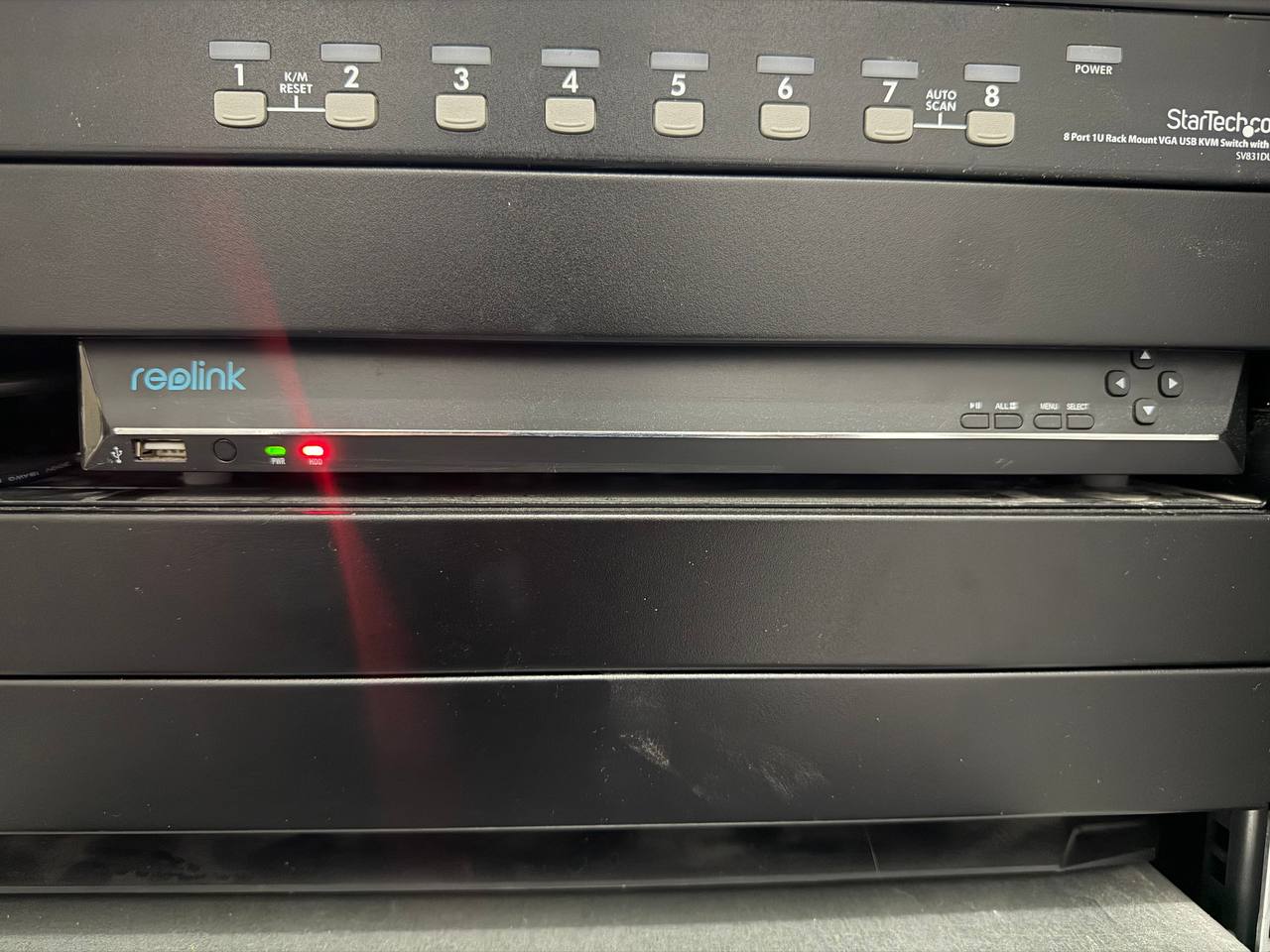
I've been running a home CCTV setup for over two years — currently on a Reolink RLN36 NVR with five PoE cameras and a YuanLey 18-port PoE switch. Here's everything you need to know to pick the right NVR for your home in 2026.
Quick Comparison Table
| NVR | Channels | Max Resolution | PoE Built-in | Storage Bays | ONVIF | Price (approx) |
|---|---|---|---|---|---|---|
| Reolink RLN36 | 36 | 16MP (4K) | ❌ External PoE switch | 2x HDD | ✅ | ~£200 |
| Reolink RLN8-410 | 8 | 4K | ✅ 8-port built-in | 1x HDD | ✅ | ~£100 |
| Annke N48PAB | 8 | 4K | ✅ 8-port built-in | 1x HDD | ✅ | ~£120 |
| Hikvision DS-7608NI-I2 | 8 | 8MP | ❌ External | 2x HDD | ✅ | ~£180 |
| Reolink RLN16-410 | 16 | 4K | ✅ 16-port built-in | 2x HDD | ✅ | ~£140 |
What to Look for in a Home NVR
Before diving into picks, here's what actually matters when you're comparing NVRs for home use:
Channels
How many cameras can it record simultaneously? Start by counting how many cameras you have now, then think about where you might add more. Leave headroom — it's far cheaper to buy a 16-channel NVR upfront than to replace an 8-channel in two years.
General guidance:
- 1–3 bed house, 4 cameras → 8-channel NVR is fine
- Larger property, side/rear/front + driveway → 16-channel
- Full property coverage with indoor and outbuildings → 36-channel
PoE Built-in vs External Switch
Some NVRs have built-in PoE ports — you plug cameras directly into the NVR. Others (like the Reolink RLN36) have no PoE, so cameras connect to a separate PoE switch which connects to the NVR via uplink.
Built-in PoE is simpler and cheaper for small setups. External PoE switch gives more flexibility — you can place cameras further from the NVR, add more cameras beyond what the NVR's PoE supports, and use a dedicated switch with a higher power budget.
Storage
Most home NVRs take 1–2 standard 3.5" HDDs. NVR-grade drives (WD Red, Seagate IronWolf) are designed for 24/7 operation and are worth the premium. At 4K continuous recording:
- 1TB → approx. 3–4 days of footage per camera
- 4TB → approx. 12–16 days per camera
- 8TB → approx. 3–4 weeks per camera
For my RLN36 with five cameras, I installed three WD Red 4TB drives. Comfortable headroom for 24/7 recording with motion-trigger alerts.
ONVIF and Home Assistant
ONVIF is a standard protocol for IP cameras and NVRs. If your NVR and cameras are ONVIF-compatible, you can mix brands freely. It also means you can integrate your NVR into Home Assistant for motion alerts, snapshots, and live feeds on dashboards.
Reolink NVRs support ONVIF and integrate well with Home Assistant via the official Reolink integration.
Our Top Picks
🥇 Best Overall — Reolink RLN36
36 channels | 16MP | No built-in PoE | 2x HDD bays | ~£200
If you want a CCTV system you won't outgrow, the RLN36 is the one to buy. Thirty-six channels is more than any home will realistically fill — but that headroom means you're future-proofed indefinitely.
I've been running this daily. It's quiet, reliable, and setup is genuinely simple if you're using Reolink cameras. The lack of built-in PoE is the main caveat — you'll need a dedicated PoE switch (I use the YuanLey 18-port), which adds cost and a second device. But the flexibility you gain is worth it.
Pros:
- 36 channels — genuinely future-proof
- Supports up to 16MP cameras
- Rock solid reliability in daily use
- Excellent Reolink app and local web interface
- ONVIF compatible
Cons:
- No built-in PoE — external switch required
- Only 2 HDD bays (though 2× 8TB is plenty)
- Reolink cameras recommended for best feature support
🥈 Best for Most Homes — Reolink RLN16-410
16 channels | 4K | Built-in 16-port PoE | 2x HDD bays | ~£140
The RLN16 is the sweet spot for most UK homes. Sixteen channels covers even a large house with cameras front, back, side, garage, and indoors — with room to expand. The built-in 16-port PoE means cameras plug straight in without needing a separate switch.
It's a cleaner, simpler installation than the RLN36, and at ~£140 it's significantly cheaper. If you're starting fresh and don't need 36 channels, this is the one I'd recommend.
Pros:
- 16 channels covers most homes easily
- Built-in PoE — cameras plug directly in
- 4K support
- Cheaper than the RLN36
Cons:
- Can't expand beyond 16 cameras without adding another NVR
- Less flexibility than external PoE switch setup
🥉 Best Budget — Reolink RLN8-410
8 channels | 4K | Built-in 8-port PoE | 1x HDD bay | ~£100
For a 1–3 bedroom house with 4–6 cameras, the RLN8-410 is all you need. It's compact, straightforward to set up, and Reolink's app is one of the better ones in this price range.
The single HDD bay means you're limited to one drive — fine for a small setup, but worth noting if you want 24/7 recording across six cameras (you'll want at least a 4TB drive).
Pros:
- Affordable entry point
- Built-in 8-port PoE
- Compact form factor
- 4K support
Cons:
- Only 8 channels — limited headroom
- Single HDD bay
- Outgrown quickly if you want to expand
Best Alternative Brand — Annke N48PAB
8 channels | 4K | Built-in 8-port PoE | 1x HDD bay | ~£120
If you want to run a mix of camera brands (non-Reolink), the Annke N48PAB is worth a look. It's fully ONVIF compliant and well-regarded in the homelab community for compatibility.
Annke's cameras are solid, but the real value here is if you already have cameras from multiple brands and need an NVR that won't fight you on compatibility.
Pros:
- Strong ONVIF compatibility
- Good UK availability
- 4K support
Cons:
- Annke's app is weaker than Reolink's
- Less community support than Hikvision or Reolink
For the Homelab — Hikvision DS-7608NI-I2
8 channels | 8MP | No built-in PoE | 2x HDD bays | ~£180
Hikvision is the professional installer's choice — it's what you'll find in most commercial CCTV installations. The DS-7608NI-I2 is the prosumer entry point: excellent build quality, comprehensive settings, and solid ONVIF implementation.
It's not as user-friendly as Reolink out of the box, and the Hik-Connect app is less polished. But if you want maximum configurability and are comfortable with a steeper learning curve, Hikvision hardware is hard to beat.
Pros:
- Professional-grade build quality
- Excellent ONVIF compatibility
- 2x HDD bays
- Very configurable
Cons:
- Steeper learning curve
- App experience inferior to Reolink
- No built-in PoE
- Pricier for spec you get
Selling subscriptions alongside CCTV?
If your NVR bundle includes cloud clips, remote monitoring, or paid access, the subscription retention audit can surface the exact friction that keeps renewals from sticking.
Review retention nowNVR vs Software (Frigate / Blue Iris)
Worth mentioning: a dedicated NVR isn't the only option. Frigate is an open-source NVR that runs on your own hardware (a Raspberry Pi 5, an old PC, or a Home Assistant box with a Coral TPU) and integrates natively with Home Assistant. Blue Iris is a Windows-only alternative with a one-time licence fee.
Choose a dedicated NVR if:
- You want plug-and-play reliability
- You don't want to maintain software
- You're not running a home server already
Choose Frigate/Blue Iris if:
- You already have a home server
- You want tight Home Assistant integration
- You want AI person/vehicle detection without a subscription
For most people, a dedicated NVR is the right call. For those already deep in Home Assistant, Frigate is worth the setup effort.
What You Need Alongside Your NVR
Don't forget the rest of the system:
- PoE Cameras — see our Best PoE Security Cameras UK 2025 guide
- PoE Switch (if your NVR has no built-in PoE) — see Best PoE Switches UK 2026
- HDDs — WD Red or Seagate IronWolf, 4TB minimum per drive
- Cat6 cable — solid core for permanent runs, Cat5e minimum
Frequently Asked Questions
What is an NVR and how does it differ from a DVR?
An NVR (Network Video Recorder) records from IP cameras over a network (Ethernet or WiFi). A DVR (Digital Video Recorder) records from analogue cameras using coaxial cable. NVRs offer higher resolution, easier installation, and ONVIF compatibility. Almost all modern home CCTV systems use NVRs.
Do I need an NVR if I have a Reolink camera?
Not necessarily — Reolink cameras can record locally to an SD card and you can view them via the Reolink app without an NVR. But an NVR gives you centralised storage, easy multi-camera review, and longer retention periods. For more than two or three cameras, an NVR is strongly recommended.
Can I use any cameras with any NVR?
If both the NVR and cameras support ONVIF, you can generally mix brands. In practice, you'll get the best feature support (motion zones, smart detection, bi-directional audio) by staying within the same brand ecosystem — Reolink cameras with a Reolink NVR, for example.
How much storage do I need?
A rough guide: 1TB per camera per week of 24/7 4K recording. Motion-only recording dramatically reduces storage — a camera that's only triggering a few times a day might only use 50–100GB per week. For most homes with 4–6 cameras on motion recording, 4–8TB total is comfortable.
Does the NVR need an internet connection?
No — NVRs record locally to hard drives and work entirely without internet. You'll want internet connectivity for remote viewing via a mobile app, but recordings are always stored on-device. This is one of the key advantages over cloud-based camera systems.
Can I connect my NVR to Home Assistant?
Yes, if it supports ONVIF or has a native Home Assistant integration. Reolink NVRs work with the official Reolink integration in Home Assistant, giving you motion triggers, snapshots, and camera feeds in your dashboards. See our Home Assistant guide for more.
What hard drives should I use in an NVR?
Use NVR/NAS-rated drives designed for 24/7 operation. The main options are WD Red and Seagate IronWolf. Avoid desktop drives (WD Blue, Seagate Barracuda) — they're not designed for always-on workloads and will fail faster.
The Bottom Line
For most UK homes, the Reolink RLN16-410 is the best all-round NVR: 16 channels, built-in PoE, 4K, and reasonable price. If you're building a serious setup and want future-proof channel count, the Reolink RLN36 is what I run and it's earned its place in my rack.
Whatever you pick, pair it with quality PoE cameras and a capable PoE switch — the NVR is only as good as the system around it.
Verdict Picks (Amazon UK, filce-21 affiliates)
- Reolink RLN36 36-Channel NVR (best overall future-proof recorder)
- Reolink RLN16-410 16-Channel NVR with built-in PoE
- Hikvision DS-7608NI-I2 8-Channel NVR (premium recording gear)
- Yuanley 18-Port PoE Switch (essential for RLN36 setups)
Add compatible cameras and switch for a complete local CCTV system.
Prices correct at time of writing and subject to change. Affiliate links (filce-21) used — these don't affect our recommendations.