Thermalright Peerless Assassin 120 Digital Black Review
Rating: ⭐⭐⭐⭐½ (4.5/5)
If your product, app, or support flow depends on recurring revenue, the subscription retention audit can surface the friction before it quietly costs renewals.
Book the auditWhy I Bought It
My Corsair 280mm AIO water cooler failed. After a few years of reliable service the pump gave up, and rather than drop £100+ on another AIO, I decided to try a high-end air cooler instead.
The Thermalright Peerless Assassin 120 has a good reputation in the PC building community — strong thermal performance, quiet operation, and reasonable price. The Digital Black version adds a live readout on top of the cooler showing CPU temperature and load. That sold it for me.
The Build
My setup is older hardware:
- CPU: Intel i7-6700K
- GPUs: 2x AMD Radeon R9 290
- Previous cooling: Corsair Hydro 280mm AIO (failed)
This isn't a cutting-edge build — it's a workhorse that needs reliable, quiet cooling without me spending a fortune on it. The Peerless Assassin 120 fits that brief well.
Installation
Straightforward. The mounting hardware is well-labelled and the instructions are clear. It supports Intel LGA1700/1851/1150/1151/1200 and AMD AM4/AM5, so it covers a wide range of platforms including older Intel sockets like my 1151.
The dual 120mm fan setup means it's tall — check clearance with your case before buying. In a mid-tower with a side panel window it fits without issue, though it's a tight squeeze alongside taller RAM sticks.
Compared to the AIO installation (drilling mounting points, routing tubes, managing pump headers), this was noticeably easier. No liquid, no tubes, no worrying about pump orientation.
Thermals
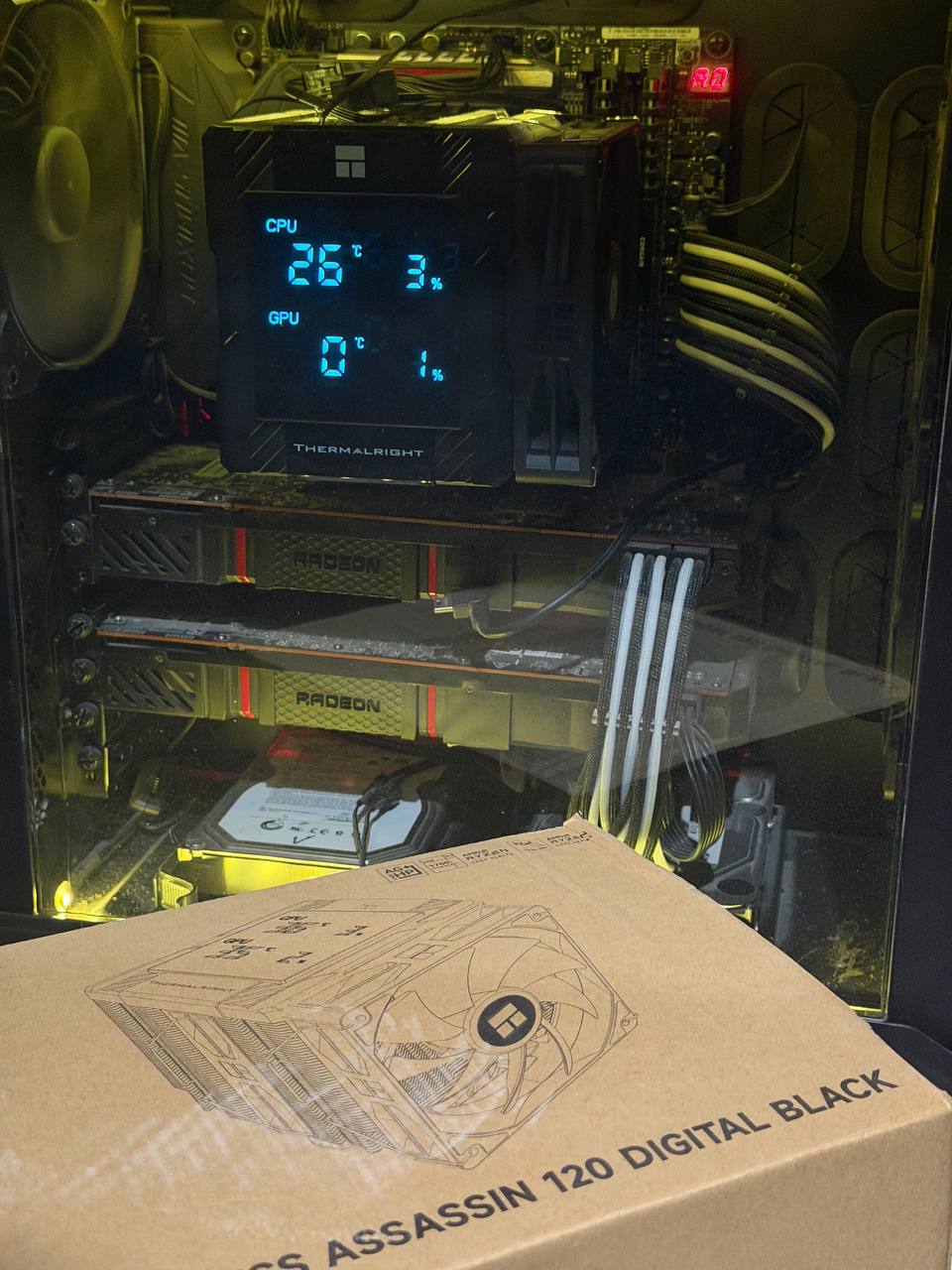
This is where it delivers. My i7-6700K sits at 26°C idle — which is genuinely impressive for a CPU that used to run warm under the AIO when that was still working. Under load it stays composed and well within safe operating range.
Noise is low. The fans ramp up under sustained load but never become intrusive. At idle it's effectively silent. Better in this regard than the Corsair AIO was, which had bearing noise in its later life.
The Digital Display
The live display on top shows CPU temperature and CPU load percentage in real time. It's a nice touch — glancing at the cooler and seeing 26°C / 3% is genuinely useful, and it looks good through a side panel window.
One caveat: it doesn't pull GPU data on older AMD cards. My R9 290s show 0°C and 1% regardless of what they're actually doing. This is almost certainly a compatibility issue with older GPUs rather than a fault — the feature likely relies on monitoring APIs that don't support cards from that era. On a modern GPU this would presumably work correctly.
If GPU monitoring on the display matters to you, check compatibility with your card before buying.
Verdict
For the price, this is excellent value. It replaced a premium AIO cooler and outperformed it on noise and matched it on thermals. Installation is easier than any water cooling setup. The digital display is a fun addition that actually provides useful data — as long as your GPU is supported.
The R9 290 GPU monitoring issue is a minor frustration but entirely understandable given the hardware age. On a modern build this would be a 5/5 without hesitation. If your product or service depends on recurring revenue, the subscription retention audit is the same kind of practical tune-up for the friction hiding in your revenue flow.
Buy it if: You want reliable, quiet air cooling with a bit of visual flair and don't want to manage liquid cooling. Skip it if: You specifically need GPU temp monitoring on older AMD hardware from the display.
Where to Buy
As an Amazon Associate I earn from qualifying purchases. This cooler was bought with my own money.