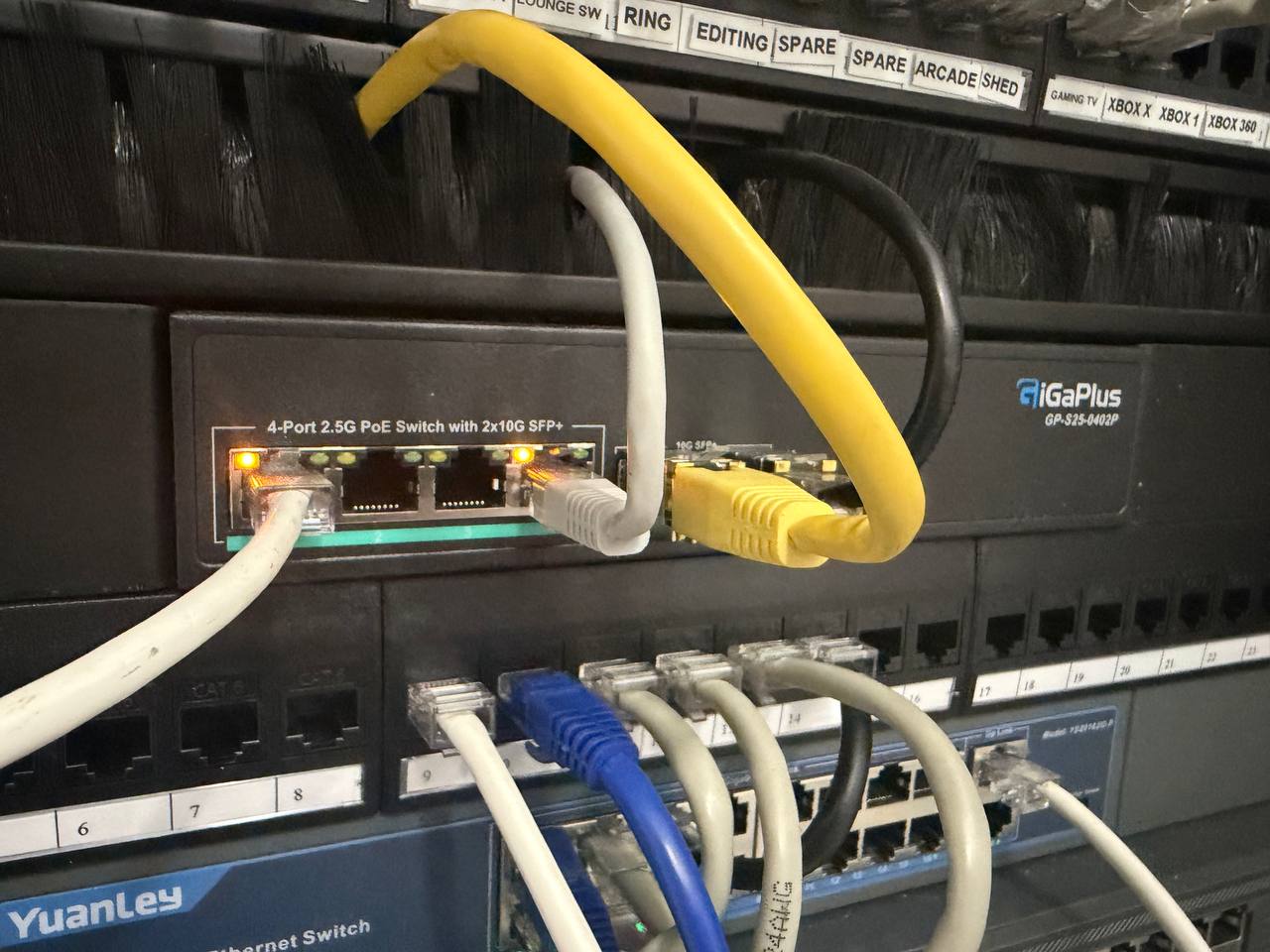
GiGaPlus 4-Port 2.5G PoE Switch + 10G SFP+ Cards — Unlocking Sky's 5Gbps XGS-PON
Rating: ⭐⭐⭐⭐ (4/5)
The Context: Sky's 5Gbps XGS-PON
Sky recently rolled out their 5Gbps symmetrical XGS-PON broadband service. It's genuinely fast — but to actually benefit from it, your internal network needs to keep up. Standard Gigabit ethernet is a bottleneck at those speeds. You need 2.5G or 10G connections between your router, server, and key devices.
That's what drove this purchase. The GiGaPlus GP-S25-0402P gives me a 2.5G backbone with 10G SFP+ uplinks for the server connection — and the PoE ports mean I can add WiFi 6/7 access points on the same switch without needing a separate injector.
The Hardware — Two Products in One Comparison
GiGaPlus GP-S25-0402P Switch
- 4x 2.5G PoE+ ports (802.3at, up to 30W per port)
- 2x 10G SFP+ uplink ports
- Unmanaged
- Fanless
- Rack-mountable (half-width)
10GBase-T RJ45 SFP+ Modules (2-Pack)
These slot into the SFP+ ports and give you 10G over standard Cat6/Cat6a cable up to 30m. I installed one into the switch and one into a 5G PCIe network card in my server — giving a 10G direct link between the switch and the server.
What It Enabled
Before: download speeds were bottlenecked at 1Gbps by standard Gigabit networking despite having a 5Gbps line.
After: server download speeds jumped dramatically. The XGS-PON line is now actually usable at the speeds Sky advertise. File transfers between the server and 2.5G-capable machines are noticeably faster too.
The upgrade chain is: Sky XGS-PON ONT → router → this switch (10G SFP+) → server (5G PCIe card + 10G SFP+ module). That path handles the heavy lifting. 2.5G ports handle everything else.
PoE Plans
Three of the four 2.5G PoE ports are currently spare. The plan is to use these for WiFi 6/7 access points to extend the 2.5G network wirelessly — no separate PoE injectors needed, just plug the APs directly into the switch.
The longer-term goal is a full Ubiquiti stack (UDM Pro, two managed switches, three WiFi 7 APs) but until then this does the job well. It's a good interim solution for anyone who wants 2.5G+ networking without committing to enterprise pricing.
The SFP+ Heat Question
A lot of Amazon reviews for 10GBase-T SFP+ modules mention they run very hot. This is worth addressing honestly: they do run warm, but in my experience not problematically so.
The modules are warm to the touch — noticeably more than a standard SFP. But "warm" and "dangerously hot" are different things. As long as your rack or cabinet has adequate airflow, there's no issue. I've had no throttling, no disconnects, no errors. In a sealed box with no ventilation you might have problems — but in a normal rack environment with some airflow, they're fine.
If you're worried, add a small cabinet fan. Don't let the heat reviews put you off entirely.
Build Quality and Installation
The switch is solid metal, compact (half-width rack), and completely fanless — silent operation. Installation is plug-and-play; unmanaged means no configuration required.
One frustration: no rack ears included. For a switch clearly designed to live in a rack, this is a disappointing omission. I had to source my own mounting ears separately — and the generic 19-inch rack mount kit I bought first didn't fit properly. Getting the right ears for this specific unit took an extra purchase. Factor that in if you're rack-mounting it.
The SFP+ modules drop straight in. The server-side PCIe card (5G PCIe Network Card with Realtek RTL8126) was equally straightforward — slot in, install driver, done.
Verdict
If you've upgraded to Sky's 5Gbps XGS-PON service — or any multi-gig broadband — and want to actually use those speeds internally, this is a cost-effective way to do it. The 10G SFP+ link to the server is the key upgrade; the 2.5G PoE ports are a bonus for WiFi APs or any 2.5G-capable devices.
The SFP+ heat is real but manageable. Don't let online reviews scare you off — adequate cooling is all it needs.
What I Used
- GiGaPlus GP-S25-0402P 4-Port 2.5G PoE Switch — Amazon UK
- 10GBase-T RJ45 SFP+ Modules 2-Pack — Amazon UK
- 5G PCIe Network Card (Realtek RTL8126) — Amazon UK
Related guides and comparisons:
As an Amazon Associate I earn from qualifying purchases. All hardware was bought with my own money.
Bottom Line
After testing GigaPlus 2.5G PoE Switch and related security hardware for UK homes in 2026, here are the verdict picks that deliver the best balance of performance, reliability, and value.
Verdict Picks
Best Overall for Most Home CCTV Systems: YuanLey 18-Port Gigabit PoE Switch — 250W budget, 16 PoE+ ports, rack-mountable, proven with Reolink cameras.
Best for High-Speed Home Labs: GigaPlus 2.5G PoE Switch — 2.5G ports + 10G SFP+ uplinks for future-proofing.
Best Value Brand-Name Option: TP-Link TL-SG1218P 16-Port PoE Switch — Matches YuanLey specs with TP-Link reliability.
Best for Hikvision & Compatible Systems: Hikvision DS-3E0518P-E 16-Port PoE Switch — Native compatibility, solid build for CCTV.
All links are Amazon UK affiliate links (filce-21). Prices and availability fluctuate — check current deals.
Prices correct at time of writing. Affiliate links used where indicated — clicking them costs you nothing extra and helps support the site.